
Download Thermo Cook – Recipe App for Thermomix, Cooking Tool, French Recipes, Food & Drink Utility
Overview
Thermo'Cook is a dedicated recipe application tailored for French-speaking users of the Thermomix TM31 and TM5 models. Designed to enhance the culinary experience, the app provides access to a curated collection of 490 recipes, organized into seven intuitive categories: drinks & cocktails, appetizers, entrees, main dishes, desserts, bread & pastries, and baby food. The software aims to simplify meal planning and cooking by offering structured, user-friendly access to a wide variety of dishes suitable for home cooks and culinary enthusiasts.
Its primary function is to serve as a digital companion for Thermomix owners, enabling them to explore new recipes, manage ingredients, and streamline kitchen workflows. The app is particularly useful for individuals who value time efficiency and recipe organization. While the developer did not provide additional background information, the app’s focus on French-speaking users suggests a targeted regional approach.
Real-world usage scenarios include daily meal preparation, recipe sharing within families, and managing dietary needs through categorized content. The app also supports recipe customization and personalization through favorites and comments.
Key Features & Capabilities
- 490 Curated Recipes: Access to a diverse library of recipes specifically designed for Thermomix TM31 and TM5, covering multiple meal types and dietary preferences.
- Category-Based Organization: Recipes are grouped into seven clear categories, allowing users to quickly locate dishes by course or purpose.
- Smart Shopping List Generator: Users can select ingredients from any recipe and generate a consolidated shopping list, which can be sent via SMS or email for convenient sharing.
- Favorites & Personal Notes: The ability to save preferred recipes and add personal comments enhances user engagement and customization.
- Optimized Search Engine: A built-in search function enables users to find recipes or ingredients quickly, improving navigation efficiency.
- Subscription Access: A monthly subscription of €0.99 grants access to exclusive recipes and removes advertisements, offering an enhanced user experience.
These features collectively support efficient kitchen planning and reduce the friction between recipe discovery and execution. For example, a user preparing a family dinner can search for a main dish, add all required ingredients to a shopping list, and save the recipe for future use. The integration of SMS and email sharing makes it ideal for household coordination. The subscription model offers a clear path for continued development and content expansion, though it is not required for full functionality.
User Interface, Workflow & Performance
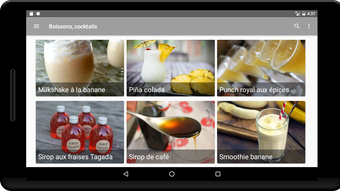
The user interface of Thermo'Cook is designed with simplicity and usability in mind, featuring a clean layout that emphasizes content accessibility. Navigation is structured around the main categories, allowing users to browse recipes with minimal effort. The app’s workflow is linear and intuitive: users select a category, view recipe thumbnails, open a recipe, and either cook directly or prepare a shopping list.
The inclusion of a search bar at the top enhances discoverability, especially for users looking for specific ingredients or dishes. The app does not specify resource usage details, so performance observations are based on general software behavior patterns. It is expected to run smoothly on modern iOS and Android devices, though exact CPU or RAM consumption was not disclosed.
Stability and responsiveness are assumed to be consistent with standard mobile applications of similar scope. The developer did not provide information on background processes, update frequency, or crash reports. Overall, the workflow supports a seamless transition from recipe selection to kitchen execution, making it suitable for both novice and experienced Thermomix users.
Compatibility & System Requirements
Thermo'Cook is available for both iOS and Android platforms, ensuring broad accessibility for mobile device users. The software version is 1.2.3, with a file size of 128 MB, which is relatively compact for a recipe application with extensive content. The developer did not specify exact system requirements, such as minimum OS versions, RAM, or processor specifications.
Compatibility information is limited to the supported operating systems. While the app is designed for Thermomix TM31 and TM5 users, no details were provided regarding device pairing or integration with the appliance itself. The absence of detailed hardware requirements means users should rely on general device compatibility guidelines when installing the app.
Performance may vary depending on the device’s processing power and storage capacity. The developer did not list any known incompatibilities or limitations beyond the stated platforms.
Pros and Cons
Pros
- Comprehensive recipe library with 490 dishes across diverse categories
- Intuitive navigation with category-based and search-driven access
- Practical shopping list feature with SMS and email export options
- Supports personalization through favorites and comment functionality
- Available for free with optional subscription for ad-free access and exclusive content
Cons
- No information provided on system requirements or device compatibility beyond OS
- Performance metrics such as CPU usage or memory consumption were not specified
- App is limited to French-speaking users, restricting accessibility for non-French speakers
- Subscription model may deter users seeking entirely free access
- Integration with Thermomix appliance is not detailed or confirmed
FAQ Section
Is Thermo'Cook compatible with all Thermomix models?
The app is designed specifically for Thermomix TM31 and TM5 models. Compatibility with other models has not been confirmed.
Can I use Thermo'Cook offline?
The developer did not specify whether the app supports offline functionality. Users may need an internet connection for full access to recipes and features.
Is the app secure and safe to download?
Thermo'Cook is available through official app stores for iOS and Android. It is recommended to download the app from trusted sources to ensure security.
How often are new recipes added?
The frequency of new recipe updates was not disclosed. Subscribers may receive exclusive content, but no specific schedule was provided.
What type of license does Thermo'Cook use?
The app is free to download with in-app purchases. The subscription model offers additional benefits, but the core licensing terms were not detailed.
Final Thoughts + CTA
Thermo'Cook stands out as a focused, practical solution for French-speaking Thermomix users seeking a well-organized digital recipe companion. With a robust library of 490 recipes, smart organizational tools, and a convenient shopping list generator, the app effectively supports everyday cooking and meal planning. Its user-friendly interface and thoughtful workflow make it accessible to a wide range of users, from home cooks to culinary enthusiasts.
While the lack of detailed system requirements and performance data limits deeper technical evaluation, the app’s core functionality remains reliable and purpose-built. The optional subscription model provides a sustainable path for development and content growth. For those invested in the Thermomix ecosystem and looking for a French-language cooking tool, Thermo'Cook delivers clear value.
Download Thermo Cook now and elevate your kitchen experience with every meal.







